Task link and list pickers
Several fields are filled by picking from things that already exist: a task to be the parent, people to assign, contexts to tag. These pickers work alike, you search and choose, so they share a page. What separates them is the field's property type, and that type changes how the picker behaves: a Text field takes one value, a List field takes many, and a Number field takes a quantity. This page is organized by that type, because it is what you need to know.
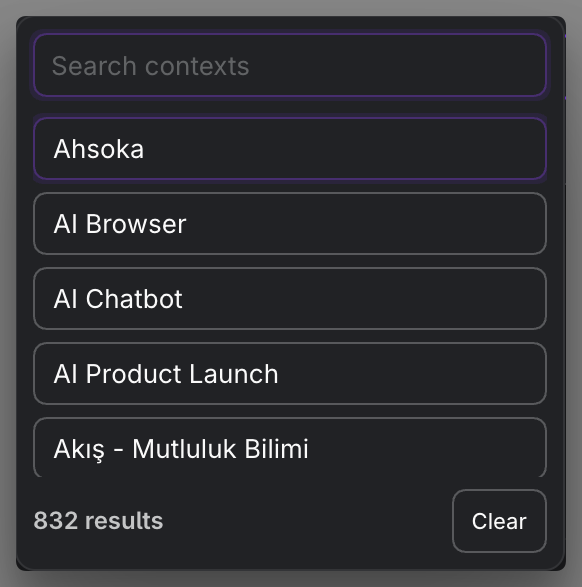
MEDIA-DOCS-069-1: A single-value link picker beside a multi-value list picker, showing the difference.
Text type: a single link
A Text field holds one value, so its picker selects exactly one thing.
parentTaskpicks the task's single parent. You search your tasks and choose one; the field stores that one task'soperonId. Selecting another parent replaces the first, because there is only one parent. See Parent and sub-tasks.
That is the shape of a single link: search, pick one, done. Clearing it leaves the task with no parent.
List type: many links or values
A List field holds several values, so its picker lets you add more than one and build up a list. You search, add an entry, and keep adding; each becomes its own item. These fields are List type:
assignees: who does the work.contexts: environment or condition the task belongs to.tags: labels on the task.links: external web links.related: related notes and references.
The picker suggests matching values as you type, often from notes and from values used elsewhere, so a vocabulary you already use is one keystroke away. You remove items individually, and the field keeps the order you built.
MEDIA-DOCS-069-2: A list picker with several values added and a suggestion appearing for the next one.

Empty-search suggestions
Before you type, Parent Task, Assignees, Tags, and Contexts use the task-based order described in Field pickers overview: a created-task value first, a different modified-task value second, then the most widely used values.
For Parent Task, the suggestion is the source task's parent, not the source task itself. For Assignees, Tags, and Contexts, each leading suggestion is a single eligible item from that task's list, chosen by overall usage. Existing selected values remain hidden where the picker normally excludes them. This only changes suggestion order, not the stored order of your list.
Type to use the usual search, or clear the search to restore the suggestions. Links, Related, Blocking, and Blocked by keep their existing ordering.
Editing a value versus following it
Creator and Task Editor field controls keep these pickers. On interactive desktop task chips and Tables, an Assignee or Context item that is a complete, existing wikilink instead opens the lightbox. Plain values and missing targets keep the picker. The same conditional rule applies to Task Type and Custom Text/List; ordinary HTTP text is not a wikilink exception.
A valid Parent target opens the current parent's source and, for an Inline parent, its current line. An empty or unresolved parent keeps the Parent picker where a control is available. To change a valid relationship, use Task Editor or the Table cell area outside its link. Previewing does not create a missing file. Blocking, Blocked by, and Related retain their dedicated behavior rather than inheriting this exception.
Dependencies: a special list
blocking and blockedBy are also List fields, and their pickers select tasks, like the parent picker but plural: the tasks this one blocks, or the tasks blocking it. They build a dependency link between tasks. Operon also maintains the other side of a dependency for you, so adding "A blocks B" is reflected on B. See Parent and sub-tasks.
Number type: the estimate
estimate is a Number field, so its picker is a quantity, not a search: you enter how long you expect the task to take. It is stored as a duration. The same numeric picker is what a custom key of type Number uses. See Time tracking for how estimate compares with tracked duration, and Custom field pickers.
FAQ
Why can I add many assignees but only one parent? parentTask is a Text field, which holds one value; assignees is a List field, which holds several. The picker follows the type.
Where do the suggestions come from? From values already in use and from notes, so you reuse a consistent vocabulary instead of retyping.
Do I set both sides of a dependency? No. Set one side, such as "blocks," and Operon reflects it on the other task.