Filter conditions and operators
A filter is built from conditions. Each condition tests one field, and the operators you can choose depend on the field and its property type. This page is the reference for those operators, plus the groups that combine conditions into a real query. For a first hands-on filter, see Build your first filtered view; this page is what to reach for when you want the full set.
MEDIA-DOCS-073-1: A single condition row showing the field, the operator, and the value input.

What a condition is
A condition has three parts: a field (such as status, dateDue, or a custom key), an operator (such as "is" or "before"), and usually a value. Operon offers only the operators that make sense for the field's type, so a date field never shows text operators and a number field never shows date operators. See Task properties for the property types.
Some operators take no value at all, like "has any value" or "is today." A few date operators take a number instead of a date, like "under X days away." The condition row switches its input to match the operator you pick.
Groups: all, any, none
Conditions live inside a group, and the group decides how they combine:
| Group | Meaning | Common name |
|---|---|---|
| All | Every condition must match | AND |
| Any | At least one must match | OR |
| None | No condition may match | NOT |
Groups can be nested: a group can hold other groups, so you can express "status is active AND (due this week OR priority is high)." This is how a filter goes from a flat list to a precise query.
MEDIA-DOCS-073-2: A nested filter with an "all" group containing an "any" subgroup.
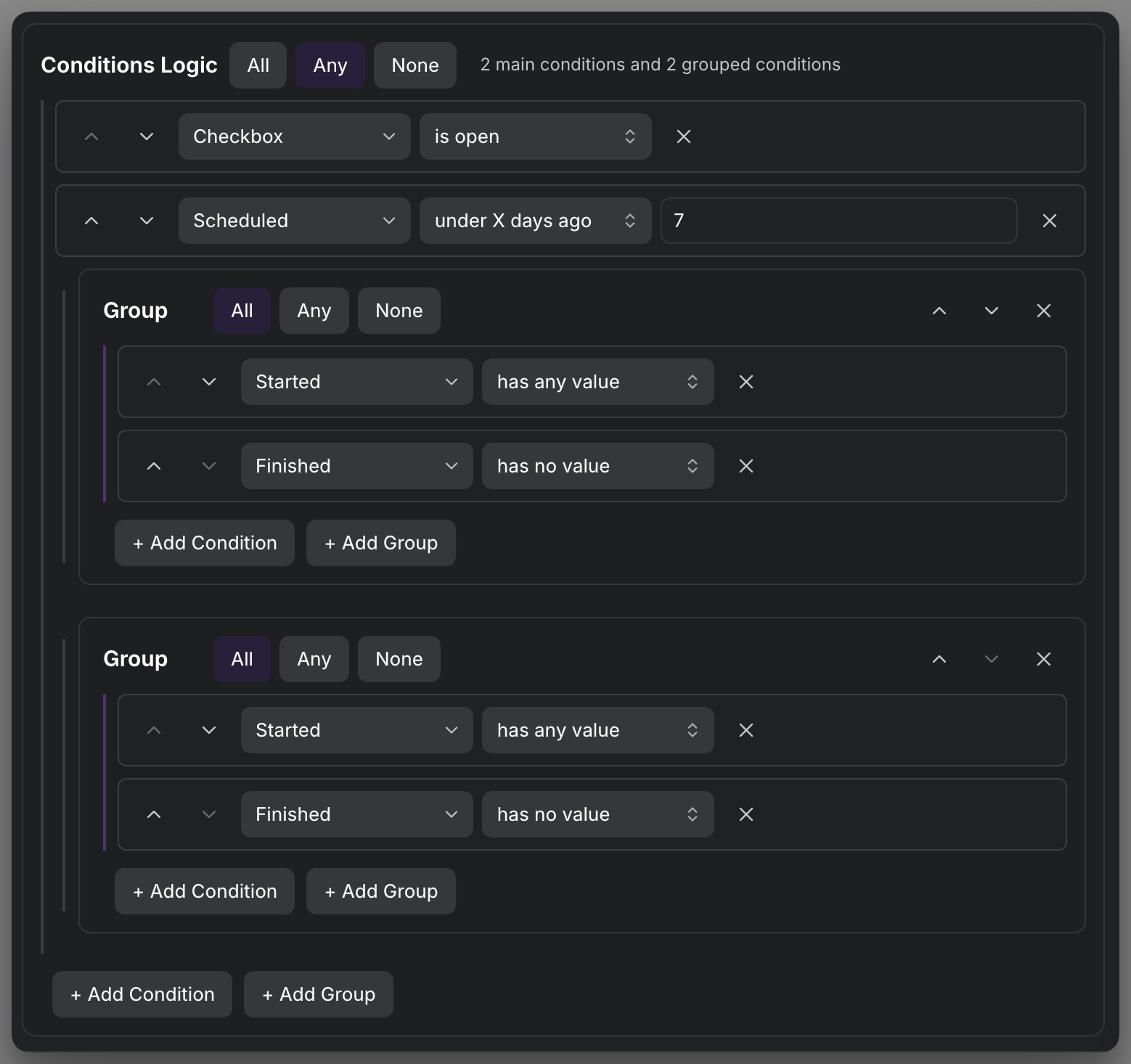
Reading and editing nested groups
Automatic group numbers follow the nesting: top-level groups are Group 1, Group 2, and so on; children of Group 1 are Group 1.1, Group 1.2, with deeper children such as Group 1.1.1. Numbers follow the current group order, not the number of condition rows. They help you locate a group; they are not persistent identifiers.
Accent-colored scope guides show which conditions and subgroups belong to each All, Any, or None choice, including the outer scope. The active logic choice stays visible, as do the group name/number and its collapse, move, and delete controls. The three logic buttons use equal widths. Condition delete buttons stay at the right edge of their own row, including conditions that need no value input.
On desktop with a mouse or trackpad, inactive logic choices and the Add Condition, Add Group, copy, and paste controls appear as quiet lines until their group is hovered or receives keyboard focus. Only the innermost hovered or keyboard-focused group reveals those controls: working inside Group 1.1 does not also reveal Group 1's inactive controls. Move back into the parent's own area to reveal its actions. Keyboard focus remains visible, and mobile or touch-only surfaces keep these controls visible without requiring hover.
This presentation is shared wherever Operon uses the filter editor; the underlying All/Any/None logic and saved conditions are unchanged.
Operators by property type
Most fields use the sets below. Tracked time and Trackers have their own choices, described alongside them.
Text
For text fields like the title or a text custom key:
contains, does not contain, is, is not, starts with, ends with, has any value, has no value, property is present, property is missing.
Number
For number fields like estimate:
equals, does not equal, less than, more than, not less than, not more than, divisible by, not divisible by, has any value, has no value, property is present, property is missing.
Date and Date & time
For date fields like dateDue and dateScheduled (date and time fields use the same set):
date is, before, after, is today, not today, before today, after today, exactly X days ago, exactly X days away, under X days ago, under X days away, over X days ago, over X days away, this week, last week, next week, this month, last month, next month, day of week is, day of week is not, month is, month is not, has any value, has no value.
The "X days" operators take a number, and "day of week is" and "month is" take a weekday or month number, so their input is numeric rather than a date picker.
When a task Date or Date & time condition opens the date picker, its selected date and suggestion dates follow Settings → Operon → Core → General → Language & Formats → Date format. The filter still stores and compares the canonical value, so changing the display preference does not change which tasks match. Natural-language input and the picker itself are covered in Date and time picker.
Repeat reference date
Repeat reference date tests the saved recurrence reference date. It uses the normal Date operators above, including relative dates and has any value / has no value. It is separate from the next occurrence calculated for a recurring task: if no reference date is saved, a calculated suggestion is not substituted into the condition.
Choose the date through the normal filter date control. Changing the saved reference through the Repeat picker refreshes matching results. A Table can show the same stored value in its Repeat reference date column; see Table columns.
Task Occurrence Date
Task Occurrence Date tests the recorded date of the current task occurrence, not the calculated date of a future successor. It uses the full Date operator set above, including before today, relative periods, and has any value / has no value. Date comparisons are day-based; this condition does not select a recurrence time of day.
A missing or invalid recorded date is empty. Operon does not substitute Scheduled, Due, creation time, today, or a forecast from the recurrence rule. For valid dates, Repeat reference date and Task Occurrence Date read the same saved field; the existing Reference date option remains available.
To find missed occurrences that still need work, use All with:
- Task Occurrence Date → before today
- Operon Task → is open
For example, an open task recorded for 9 October still matches after that date even if the next task would occur in November. Completed and cancelled tasks do not match the combined filter. Only saved task occurrences are considered; the filter does not generate missed tasks or enumerate uncreated recurrence dates.
Both recurrence date options are also available in the filter editor's Sort section. Ascending orders dated tasks from earlier to later; descending reverses them. They are not additional Group by choices in the filter editor. See Table grouping and sorting for Table sorting.
Tracked time
Tracked time filters saved sessions by their local start date. It selects both the tasks and the sessions shown in the filtered view; it does not add a date field to the task.
It uses the date operators above except after today, the three X days away choices, next week, and next month. It also offers in the last X days: enter a positive whole number, such as 7 for today and the previous six calendar days. Week choices run Monday through Sunday.
For a custom range, put two Tracked time conditions in an All group. before and after exclude the chosen date, so September 10–20 inclusive becomes after September 9 and before September 21. For a single day, use date is. New conditions do not offer is between.
Combining time conditions
| Combination | Result |
|---|---|
| All with several time conditions | The same session must satisfy every date condition. Two sessions on opposite sides of a range do not count as a match. |
| Any with several time groups | Each task uses the sessions from the groups it matches. A session matching both groups is counted once. |
| A time group with a Duration condition | Duration is tested against that group's selected sessions, before results from other matching groups are combined. |
| None | A task is excluded if any child condition or group matches; this does not simply hide individual sessions. |
For example, an Any group can combine "High priority + last 7 days" with "Low priority + last 30 days." Each task uses its matching group's period. Time conditions in an enclosing All group also apply to its nested groups.
If a task qualifies only through a non-time alternative, such as "priority is High," it can still appear, but its selected session list is empty and its period duration is zero. That alternative does not bring older sessions back into the view.
not today selects sessions from other days, even if the task also has a session today. has any value finds tasks with valid completed sessions; has no value finds those without any. Malformed records are not treated as an empty history.
See Time tracking for period totals and sessions that cross midnight.
List and tags
For list fields like assignees, contexts, links, and tags:
any item contains, any item starts with, any item ends with, no item contains, no item starts with, no item ends with, all items are, all items contain, count is, count is not, count less than, count more than, has any value, has no value.
The count operators test how many entries the list has, which is useful for "has more than one assignee."
Trackers
Use Trackers to test the number of saved time entries or whether any exist:
count is, count is not, count less than, count more than, has any value, has no value.
For dates, use Tracked time. Trackers no longer offers text-matching operators for new conditions.
Checkbox
For a task's open or closed state: is open, is done, is cancelled.
File task property operators
A file task property gets its operators from the same type-based lists above, with two differences that matter because a discovered property is not a field every task structurally has:
- Checkbox is a real boolean here, not a task's open/closed state. A file task property typed Checkbox uses
is true,is false,has any value,has no value,property is present,property is missing, not theis open/is done/is cancelledset built-in Checkbox fields use. - Date, Date & time, List, and Tags gain
property is presentandproperty is missing. A built-in date or list field does not need these, every task has that slot, but a discovered property may not exist on a given note's frontmatter at all, so these two operators let a condition tell "missing" apart from "present but empty." - Text and Number use exactly the same operator lists as their built-in counterparts, since those already include
property is presentandproperty is missing.
Structural conditions
A few conditions test a task's place in the system rather than a single field value:
- Pinned:
is pinned, true for tasks on the dock. - Task tree:
matches task tree, for filtering by a task's parent or subtask relationship. See Parent and sub-tasks. - Folder:
is in folder tree, true when the task's file sits inside a chosen folder. - Project Serial Group: filters by a task's project serial group, the prefix its serial carries. Use
has any project serial grouporhas no project serial groupto separate tasks that hold a serial from those that do not;is any oforis none ofto pick specific groups from a searchable list, which also offers to select every group starting with a prefix; orstarts withanddoes not start withto match groups by a prefix you type.
These let a filter say "anything under this project," "only pinned work," or "only tasks in the DOCS serial group," not just field comparisons.
FAQ
Why are some operators missing for my field? Choices depend on both the field and its property type. Tracked time and Trackers use the focused sets described above.
What happens to saved conditions with retired operators? Existing Tracked time and Trackers conditions keep working. Their retired operators are no longer offered for new conditions.
How do I express OR? Put the alternatives in an "any" group. Combine with an outer "all" group for AND plus OR together.
Why did the value box disappear? The operator you chose needs no value, like "is today" or "has any value."
Why does a Checkbox condition on a frontmatter property say "is true" instead of "is open"? It is a file task property, a real boolean, not the task's own open or closed state, so it gets is true / is false plus presence operators instead.