Recurrence picker
The recurrence picker builds a recurrence rule for you, so you set how a task repeats with controls rather than by typing the repeat syntax. It is the friendly face of recurring tasks: choose a frequency, an interval, and the details, and Operon writes the rule.
This picker sets the repeat field, whose property type is Text (a compact rule string). You rarely read that string, because this control writes it. See Recurring tasks for the rule itself.
MEDIA-DOCS-064-1: The recurrence picker with a frequency, interval, and weekday selection.
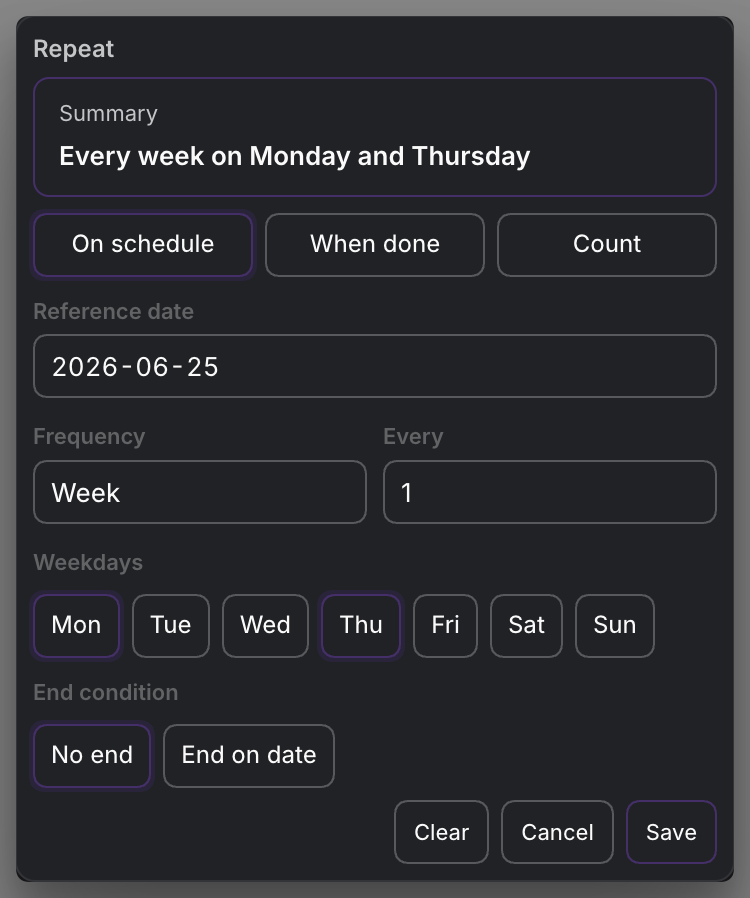
Frequency and interval
Two controls form the base of every rule:
- Frequency: day, week, month, or year.
- Interval: how many of those between runs. Interval 1 is every time, 2 is every other, and so on. "Every 2 weeks" is frequency week, interval 2.
That alone covers most routines. The rest is detail for when you need it.
Weekly and monthly detail
The picker shows extra controls that fit the frequency:
- Weekly: choose which weekdays it lands on (Mo through Su), so a rule can repeat on, say, Monday, Wednesday, and Friday.
- Monthly: choose between two ways to land. By day of the month (the 15th), or by a weekday position (the first Tuesday, the last Friday). The position options are first, second, third, fourth, and last.
MEDIA-DOCS-064-2: The monthly options, switching between a day of the month and a weekday position like "last Friday."

When the next run is measured from
The picker also sets the rule's mode, which decides what the next occurrence is counted from:
- Schedule: the next run is based on the scheduled date, so a weekly task stays on its day whether or not you finished on time.
- Done: the next run is based on when you complete it, so the clock restarts from completion. Good for "every 30 days after I last did it."
- Count: the series repeats a fixed number of times, then stops.
The modes behave differently in ways worth understanding before you choose one. For each mode with examples, guidance on which to use, and what to watch, see Recurrence rules and modes.
Reference date and saving
The picker's Reference date controls the anchor used by its recurrence configuration. An existing saved reference is retained when the rule is reopened; the picker can suggest an initial date when no reference is saved. A suggestion in the picker does not mean a reference already exists on the task. Done mode still follows its completion-based rule rather than becoming schedule mode.
Tables expose the stored value as Repeat reference date, formatted with your preferred Date format and empty when no date is saved. Clicking that column opens this Repeat picker, not a standalone date editor. The same saved value is available in filter conditions and as a sort option.
Task Occurrence Date presents the valid recorded date of the current task, using the same saved field. It is available as a filter condition, sort option, and Table column; it is not a forecast of the next task. Clicking an editable cell in either date column opens this picker.
The repeat chip shows the recorded occurrence date, formatted like Scheduled and Due. Its tooltip is headed Recurrence Rule and describes the pattern and any end date. With a valid rule but no valid recorded date, it shows No occurrence date.
In Task Creator, Save and Clear update the current draft immediately for both Inline and File tasks. Saved reference dates and Count configuration remain available when reopened; cancelling leaves the previous draft unchanged. The task itself is written only when creation is confirmed. See Task Creator.
Ending the series
A recurrence does not have to run forever. You can set an end date, after which no further occurrences are generated, or use the count mode to stop after a set number. Leave both open for an open-ended routine.
FAQ
Do I ever type the rule? Rarely. The picker writes it. You can still edit the repeat field by hand if you prefer. See Recurring tasks.
What is the difference between schedule and done mode? Schedule counts the next run from the scheduled date; done counts it from when you complete the task.
Can it repeat on specific weekdays? Yes. With weekly frequency, pick the weekdays it should land on.
Settings
Operon settings for recurrence live in Settings → Operon → Tasks → Recurrence, which configures how recurring occurrences are generated.