FlowTime focus sessions
FlowTime is the focus side of Operon's time tracking. Where TrackTime is a stopwatch that counts up while you work, FlowTime is a countdown: you pick a task and a length, and it runs down while you focus, with breaks when you need them and a gentle nudge when time is up. Same recorded effort underneath, a different way to work.
MEDIA-DOCS-035-1: The FlowTime panel counting down on a focused task.

Start a session
Open the panel with Open FlowTime panel from the command palette. The panel has two modes, TrackTime and FlowTime; choose FlowTime. Pick the task to focus on, set the session length in minutes, and the countdown begins. The time you spend is recorded against the task, just as it is with TrackTime, so a focus session still feeds the task's duration.
Breaks
Use Start break (Coffee) while tracking an assigned task. Operon records the work session and starts a break, leaving that task ready to resume. A failed session save does not start the break. The break length has a configurable default.
End break stops the break and keeps the task waiting; it does not restart work. Use Play to start a new work session for the waiting task, either during or after the break.
FlowTime and the desktop Status Dock share one break state. Closing the FlowTime panel does not end the break. Reloading Operon or restarting Obsidian clears the temporary break and waiting task; recorded work sessions remain saved.
Choose a different task
Task Finder and Task Creator are available when idle, while a timer is unassigned, during a break, and after a break with a waiting task. During a break they appear alongside Coffee; when no break is active and a task can be selected, Finder replaces the inactive Coffee action.
Successfully choosing or creating a task starts tracking it and ends any active break. Cancelling leaves the existing timer or break state unchanged. These controls use the same tracking flow in FlowTime and the Status Dock; see Status Dock for the compact control layout.
Reaching zero, and overtime
When the countdown hits zero, FlowTime marks the target reached and can show a small notice, so you know the planned time is up without staring at the timer. It does not cut you off: it rolls into Overtime and keeps counting, so if you are in flow you can keep going and still see how far past your target you have gone. The notice is independent of the optional completion sound described below.
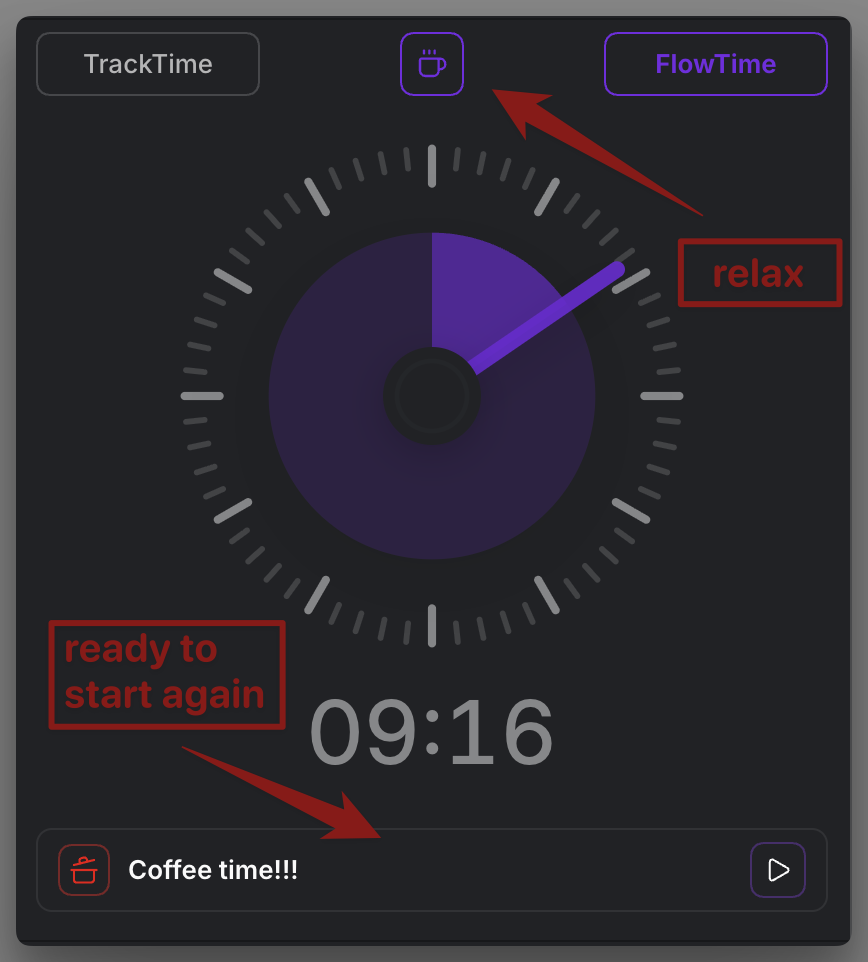
MEDIA-DOCS-035-2: FlowTime in overtime after the countdown reached zero, with a break control available.
Why a focus mode, not Pomodoro
Operon does not ship a Pomodoro timer, the kind that forces fixed 25-minute work blocks and 5-minute breaks on a rigid cycle. FlowTime takes a softer approach: you set a length that fits the task, take breaks when you actually need them, and the timer never cuts you off at zero. The point is to protect a stretch of focus, not to chop it into fixed intervals.
The name nods to the idea of flowtime, a flexible alternative to Pomodoro. Instead of letting a clock interrupt you mid-thought, you commit to one task and let its natural rhythm decide when to pause. That idea explains two of FlowTime's choices:
- Reaching the target rolls into overtime instead of stopping. Being in flow is never punished with a hard stop; you decide when to end.
- Breaks are something you start, not a pause forced on you. A break is deliberate and visible, taken when you need it.
So the length you set is a soft target, not a deadline. If you want no target at all, TrackTime is the count-up companion for plain effort logging.
FlowTime or TrackTime?
- FlowTime: a timeboxed focus session. Use it when you want to commit to a stretch of focused work with a clear target and breaks.
- TrackTime: a plain count-up stopwatch. Use it when you just want to log effort without a target. See Time tracking.
Both record to the same task, so the choice is about how you want to work, not where the time lands. To review what you recorded, open the Time session history.
Completion sound
Play reminder sound when FlowTime reaches zero is off by default. When you turn it on, FlowTime plays the vault audio file selected under Settings → Operon → Tasks → Reminders → Reminder sound once when either a focus session or an active break reaches zero. It does not replay in overtime, when you open an already-elapsed timer, or when you enable the setting after the boundary has passed.
The shared break produces one completion alert rather than one per open panel or dock.
This sound setting is separate from Notify when FlowTime reaches zero: you can use the notice, the sound, both, or neither. It applies only to FlowTime focus and break completions; it does not change TrackTime's count-up behavior.
FAQ
Does FlowTime stop me when the timer ends? No. It marks the target reached and continues into overtime, so you decide when to stop.
Do FlowTime sessions count toward the task's time? Yes. Like TrackTime, FlowTime records real effort onto the task's duration.
Can I take breaks? Yes. Coffee records the work session and starts a break. End break leaves the task waiting; Play starts a new work session.
Can FlowTime play a sound when time is up? Yes. Turn on Play reminder sound when FlowTime reaches zero. It uses the audio file selected under Reminders → Reminder sound and plays once for a FlowTime focus or break completion.
Is there a Pomodoro timer? No. Operon has no fixed Pomodoro cycle. FlowTime is a flexible focus session instead: set your own length, take breaks on demand, and continue into overtime past the target. Use TrackTime when you just want to count up.
Settings
Operon settings for this live in Settings → Operon → Tasks → Tracker, in the TrackTime & FlowTime section: the default session length, the break (pause) duration, whether to reuse your last chosen length, the numeric timer, the notice when the countdown reaches zero, and the optional FlowTime completion sound. The sound uses Settings → Operon → Tasks → Reminders → Reminder sound as its file source.